Module 2 of 8 · A List of Your Own
Module 2 - Something worth an email address
Read: about 12 minutes · Build: about 3 hours · Week 2
Just got your plan from What You Could Teach? You're in the right place, and you haven't missed anything. This is lesson two of eight, and the first three are free to read.
Your plan already has what Module 1 asks you to work out: your topic, the person it's for, and an outline for the thing you could give away. One thing from Module 1 you'll still need before next week is two free accounts - Module 1's build task has both links and explains why there are two.
Following the course from Module 1? Carry straight on.
Last week ended with a sentence: I help [who] with [what], because [why me].
This week that sentence turns into something real. It is the biggest single build in the course, and it is the one people most often skip, water down, or spend three months on. I want to keep you out of all three ditches.
Haven't written your one sentence yet? It takes a few minutes and every decision in this module depends on it.
Go back to Module 1's build task first.
And if you sat down to write it and nothing came, that's a different problem. You're not out of ideas - you're being asked the wrong question. Start with what you already know, then come back.
What you're actually making
The industry calls this a lead magnet. I'm going to keep calling it the thing, because "lead magnet" makes it sound like a device for capturing people, and what you're making is closer to a small favor.
It's one useful item that you give away, and the price is an email address.
That's the whole idea. What makes it hard isn't the making. It's that most people misunderstand the job it has to do, and so they build the wrong thing beautifully.
The job it has to do
The thing has two jobs, and almost everybody knows about the first one.
Job one: be worth an email address. Not worth money. Worth an address. That's a much lower bar than people assume, and I'll come back to how low.
Job two: set the expectation. This is the one nobody plans for, and it causes more damage.
Whatever someone signs up to get, that's what they think you're about. If they hand over an address for a checklist on growing tomatoes and the next email is about affiliate marketing, they don't think "how interesting." They think they've been had, and they leave. Not because your email was bad, but because it wasn't the thing they said yes to.
So the thing you make is a promise about what you'll be talking about for the next year. Get it wrong and you spend Module 4 writing good emails to people who joined for something else.
Which means the thing has to come out of the sentence. Not out of what's popular, not out of what someone else gave away successfully. Yours.
Why "free tips" gets you nothing
Here's the most common version of this, and it fails quietly.
Sign up for my newsletter for free tips and updates!
Read it as the visitor. It asks for something specific - your email address, which you'll have for years and which already gets too much mail. And in exchange it offers... tips. At some point. About something.
Nobody can picture that. And you can't want what you can't picture.
Compare:
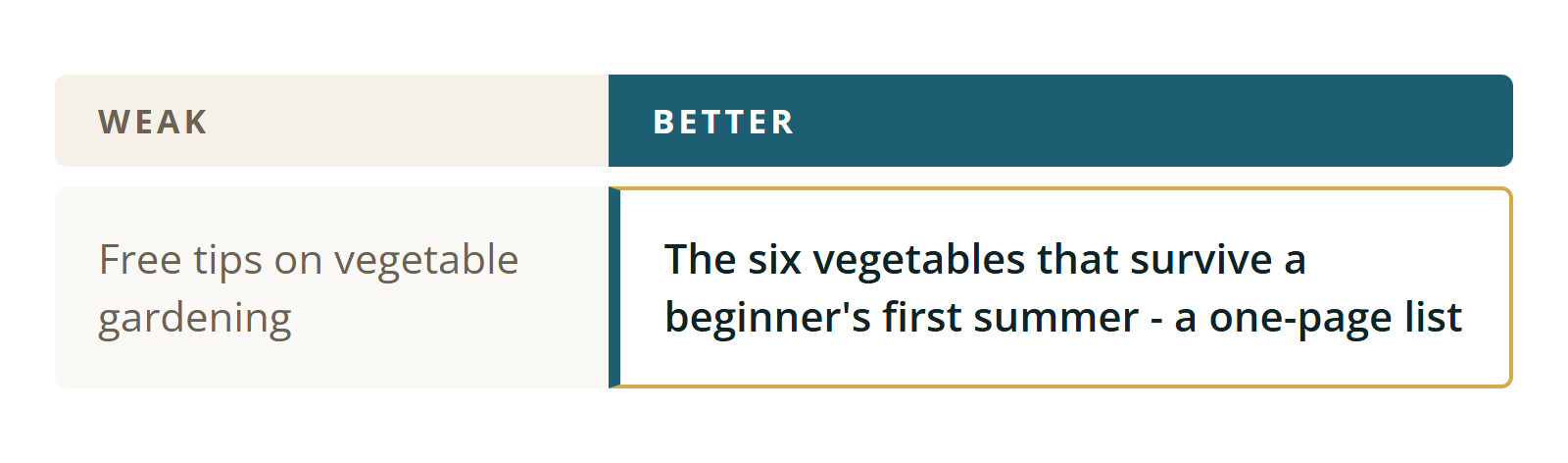
Same subject. The second one names an outcome, tells you the size of it, and admits it's for beginners.
I'm not going to tell you the second gets you three times as many signups, because I don't know that and neither does anyone who quotes you a number. What I'll say is this: run the test on yourself. Which one would you type your email address into? That instinct is right, and it's the only test you need at this stage.
The pattern underneath: people don't give an address for value. They give it for an outcome they can picture.
Small and finished beats ambitious and unfinished
Now the ditch most beginners fall into - and believe me, I fell into it more than once.
You sit down to make something worth an email address, decide it should be really good, and start writing a book. Forty pages. Chapters. An introduction about your journey.
Two things happen. The first is that it doesn't get finished. It takes a weekend, then another weekend, then it's four weeks later and the momentum you had in Module 1 is gone. This is the single most common place this course quietly stops for people, and I'd rather tell you now than commiserate later.
The second thing is worse, because it happens even to the people who do finish.
A forty-page ebook is a debt you hand your reader. They download it, feel a small weight of obligation, put it in a folder, and never open it. It proves nothing about you, because they never read it. Meanwhile the person who got a one-page checklist used it that afternoon and now has a small, specific reason to think you're worth listening to.
Big things impress. Small things get used. Only one of those builds a relationship.
The rule for this module: your reader should be able to finish it in one sitting and get one thing done.
If that sounds like it's too small to be worth an email address, sit with the discomfort for a minute. It isn't. A person who has been stuck on one thing for a month will happily trade an address for the fix.
The test
Before you make anything, you should be able to finish this sentence:
After reading this, they can ______ , which they couldn't before.
One verb. Something they can do, decide, or stop worrying about.
If you can't fill that in, you don't have a thing yet - you have a topic. Topics feel like progress and produce nothing. Push on it until there's a verb in there.
Finding yours
Take your sentence from Module 1 and ask three questions. The third one is where most good answers come from.
One. What goes wrong first?
Not the advanced problem. The first one. The one that stops people before they ever get to the interesting part. If your sentence is about helping people over sixty get comfortable with AI, the first problem isn't which tool is best - it's that they don't know what to type into the box.
Two. What do they ask you?
If people already ask you things, the answer to the most repeated question is your thing, already tested. You've watched it be useful. That's better data than any amount of research.
Three. What did you figure out the hard way?
Something that cost you an afternoon and should have cost you ten minutes. A setting nobody mentions. An order of operations that isn't obvious. A list of what to ignore.
Number three is the richest source, because you already paid for it in time and frustration, and because nobody else has written it down - the people who know it forgot it was ever hard.
Five shapes that work
You don't need to invent a format. Pick one of these.
The checklist. A list of things to do or check, in order, with nothing else. Best when the reader's problem is forgetting steps rather than not knowing them.
Example: "Before you post a room to rent - the eleven-point check."
The short list of what you use. The tools, products, or services you personally use, and one line on why each. Honest and easy.
One rule, and it's not negotiable: only put things on this list that you've actually used. Recommending something you've never touched is how the industry earned its reputation, and it's the fastest way to lose a reader who tries it and finds out.
The walkthrough. One process, start to finish, with the bit that trips everyone up called out. Screenshots if it's on a screen.
Example: "Setting up a video call with the grandchildren - the whole thing, with the two settings that cause most of the trouble."
The template or the script. Something with blanks in it. A letter, an email, a plan, a form of words for an awkward conversation.
These are quietly the most valued of the five, because they remove the blank page - and the blank page is what actually stops people.
The first-week plan. What to do on day one, day two, day three. Best when your reader is overwhelmed rather than uninformed.
Any of these can be one page. Several of the best are.
What to leave out
The title does half of the work
The title is not decoration. On your page next week, the title is the offer - it's most of what the visitor reads before deciding.
Three things a good one does: names the outcome, hints at the size, and quietly says who it's for.
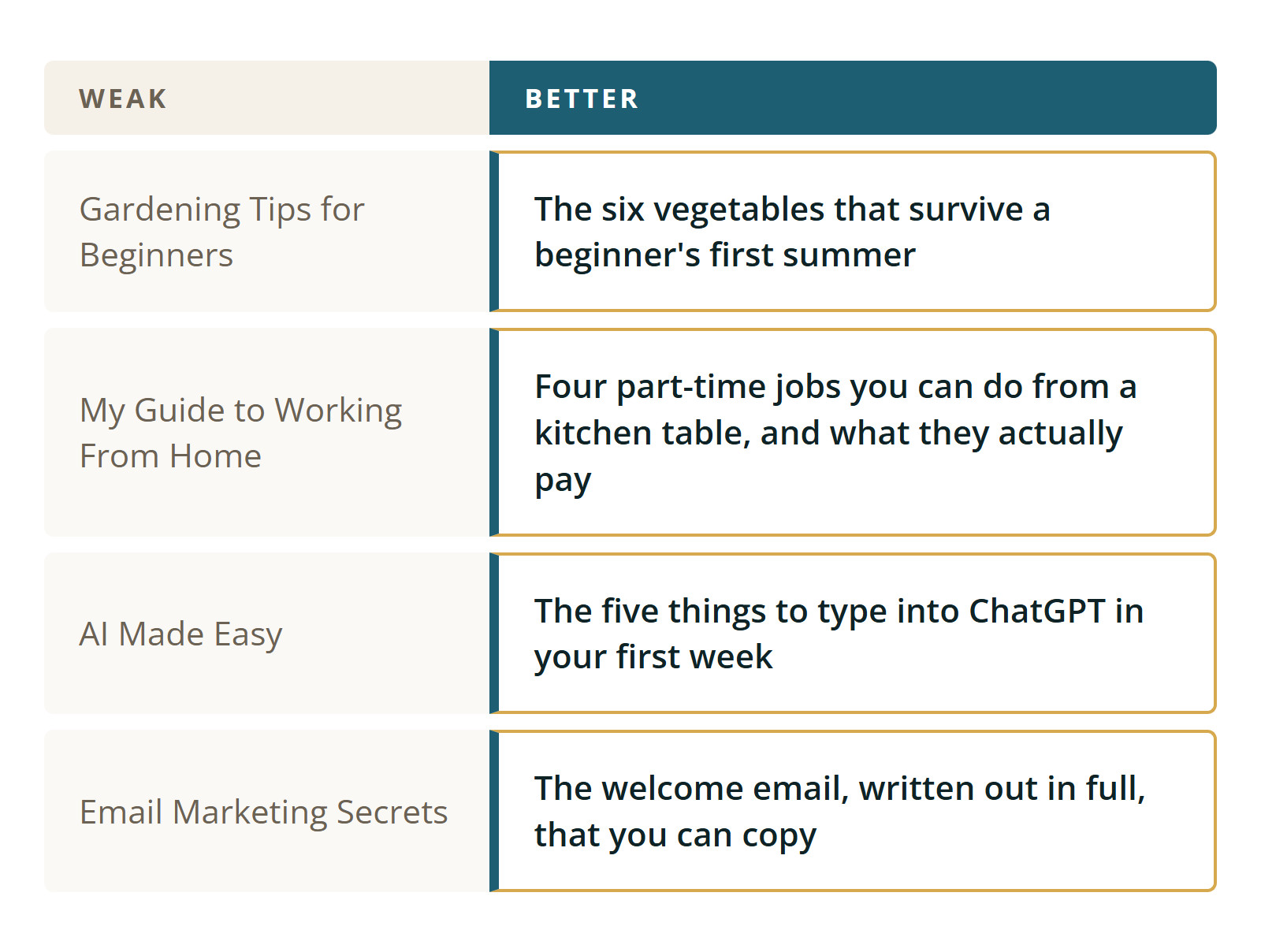
Notice the better version is longer, more specific and plain. That's usually how it goes. Plain and specific beats short and clever, every time, for this audience.
And if you're tempted to put a number of minutes in the title - "in 20 minutes" - it has to be true. Time your own read.
Making it, without design skills
You need no design ability whatsoever. Here's the whole production process.
Write it in whatever you already use. Google Docs, Word, Pages. Not a design tool. You're writing, not designing.
Keep the formatting boring. A title at the top. Headings if it needs them. Short paragraphs. Bullets for anything that's a list. One idea per line. Plenty of white space, which happens naturally if you keep paragraphs to two or three lines.
Don't make a cover. A title at the top of page one is a cover. Nobody has ever declined a checklist for want of a cover.
Export it as a PDF. In Google Docs that's File, then Download, then PDF. In Word it's Save As and choose PDF. A PDF matters because it looks the same on every device and can't be accidentally edited.
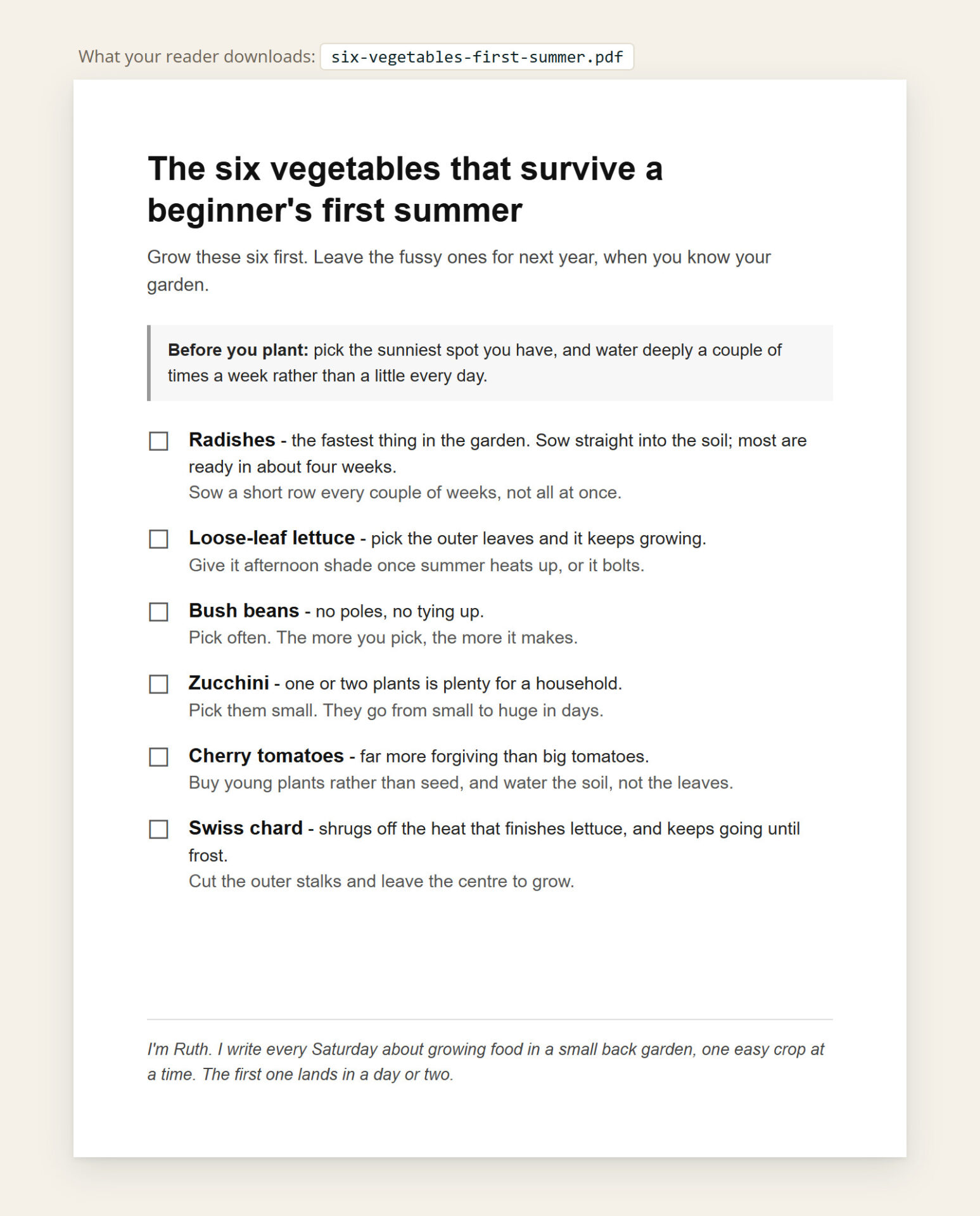
Name the file like a human. six-vegetables-first-summer.pdf, not lead magnet final v3.pdf. Your reader sees that filename.
Put one short line at the end. Who you are, in a sentence, and what's coming next by email. Something like: "I'm Bob. I write about growing food in small spaces, one small step at a time - so that's where you'll hear from me next." That line is the bridge from this thing to your emails, and Module 4 picks it up from there.
On using AI to help. Use it as an editor, not as an author. Write your rough version first, then ask it to cut what's repetitive or tell you where you skipped a step. If you ask it to write the whole thing from a blank prompt, you get the beige, over-explained nothing that everyone can now recognize on sight - and your reader has read plenty of it already this week. I use AI most days and I'll show you exactly how in Module 4.
Where it will live
Short answer: don't worry about it today.
Next week you build the page that asks for the address - and the page that hands the file over the moment somebody asks for it. Systeme.io will hold the file for you and give you a link to it, so you don't need anywhere else to put it and there's nothing extra to pay. The week after, the same file goes out by email as well.
I'm an affiliate for both the programs this course uses, and you should know that whenever I mention either of them. Neither pays me anything for a free account, it doesn't cost you anything, and it isn't why I chose them - the reasons are in Module 1.
All you need today is a finished file on your own computer.
The part that matters
Version one is allowed to be thin.
I want to say that clearly, because the failure mode here isn't a weak first attempt. It's not having one. A thin thing that exists can be replaced next month with a better one, and everybody who already joined stays joined - they don't get un-subscribed when you improve it. Nothing is lost by starting small. Months are lost by starting big.
So set a stopping point before you begin. One sitting. This week. Then it's done and you move to Module 3.
If at the end of it you look at what you made and think "is that all?" - that's the normal feeling, and it's not evidence about the quality. Send it to one person and watch what they say.
Your build task
Four steps, about three hours. Do them in one sitting if you can.
One. Pick the problem, and write the outcome down. (15 minutes)
Use the three questions above. Then finish this out loud: "After reading this, they can ______ ." Don't start writing until that sentence exists.
Two. Write the rough version. (60 to 90 minutes)
Ugly and complete beats polished and half done. Do not edit while you write - you'll stall. Get to the end first.
Three. Cut it, then title it. (30 minutes)
Take out the throat-clearing at the start and anything that doesn't serve the one outcome. Then write the title, using the pairs above. Give the title five real minutes; it earns them. Remember, you can polish it with AI.
Four. Finish the file. (15 minutes)
Add the one-line sign-off at the end. Export as PDF. Name the file properly. Put it somewhere you'll find it - you'll need it in Module 3 and again in Module 4.
Optional, and worth it: send it to one person who resembles the person in your sentence. Ask one question - "was any of that unclear?" Don't ask if they liked it; they'll say yes.
Pro Tip
Before you write a word, write the file name - something like six-vegetables-first-summer.pdf. If you can't name the file in five or six plain words, the thing you're making is still too big. Cut it down until the name comes easily.
What happens next
Module 3 is the page that asks. One promise, one field, one button - built in Systeme.io, with the thing you made waiting on the page after it, and tested with your own email address before a single stranger sees it. About ninety minutes.
One warning before you go. Traffic is two weeks away, and it's the exciting part. The urge to skip ahead and start sending visitors will be strongest around then. Visitors sent to a page that isn't wired up correctly are gone permanently, and you won't get a second run at them. Test first. That's most of what Module 3 is about.
Talk soon,
Bob